
Supported AI Service Providers
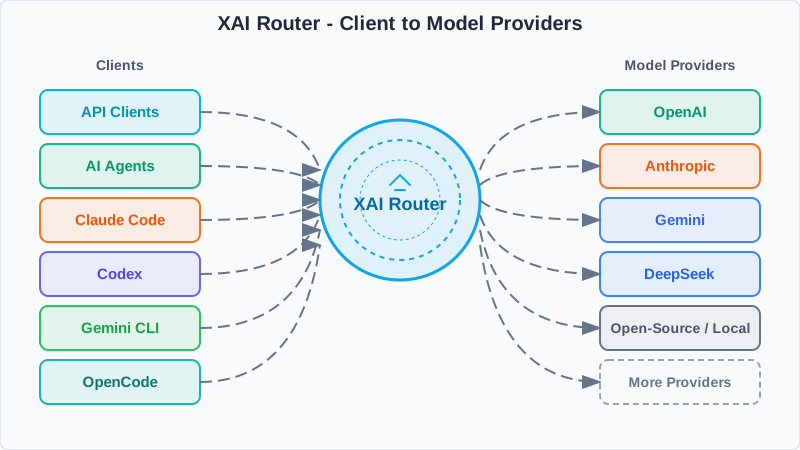
The XAI platform is compatible with virtually all major AI providers and model ecosystems, supporting unified integration and flexible switching.
How It Works
One entrypoint handles auth, routing, and normalization before reaching model providers.
1
Single entrypoint
Use one XAI API key and a unified base_url.
2
Smart routing
Policies, model mapping, rate limits, and observability live in the router.
3
Provider fan-out
Requests go to OpenAI, Claude, Gemini, and more, then normalize on the way back.
SDK Code Examples
OpenAI SDK Example
import os
from openai import OpenAI

XAI_API_KEY = os.getenv("XAI_API_KEY")
client = OpenAI(
    api_key=XAI_API_KEY,
    base_url="",
)

completion = client.chat.completions.create(
    model="gpt-5.6-sol",
    messages=[
	{"role": "system", "content": "You are AI"},
	{"role": "user", "content": "What is the meaning of life, the universe, and everything?"},
    ],
)

print(completion.choices[0].message)
Anthropic SDK Example
import os
from anthropic import Anthropic

XAI_API_KEY = os.getenv("XAI_API_KEY")
client = Anthropic(
    api_key=XAI_API_KEY,
    base_url="",
)
message = client.messages.create(
    model="claude-sonnet-5",
    max_tokens=128,
    system="You are AI.",
    messages=[
	{
	    "role": "user",
	    "content": "What is the meaning of life, the universe, and everything?",
	},
    ],
)
print(message.content)
cURL Examples
OpenAI /responses
curl /responses \
  -H "Content-Type: application/json" \
  -H "Authorization: Bearer $XAI_API_KEY" \
  -d '{
    "model": "gpt-5.6-sol",
    "input": "Explain what the Responses API does in one sentence."
  }'
OpenAI /chat/completions
curl /chat/completions \
  -H "Content-Type: application/json" \
  -H "Authorization: Bearer $XAI_API_KEY" \
  -d '{
    "model": "gpt-5.6-sol",
    "messages": [
      {
        "role": "developer",
        "content": "You are a helpful assistant."
      },
      {
        "role": "user",
        "content": "Hello!"
      }
    ]
  }'
Images API /v1/images/generations
curl /v1/images/generations \
  -H "Content-Type: application/json" \
  -H "Authorization: Bearer $XAI_API_KEY" \
  -d '{
    "model": "gpt-image-2.5-sunburst",
    "prompt": "Generate a polished square portrait of a professional XAI AI assistant in a bright futuristic control room. No text, no logos, no watermark.",
    "size": "1024x1024",
    "quality": "high",
    "output_format": "png"
  }' | jq -r '.data[0].b64_json' | base64 -d > xai-image.png
Images API /v1/images/edits
curl /v1/images/edits \
  -H "Authorization: Bearer $XAI_API_KEY" \
  -F "model=gpt-image-2.5-sunburst" \
  -F "image=@source.png" \
  -F "prompt=Keep the same assistant identity and pose, but make the lighting brighter and add subtle floating interface panels. No text, no logos, no watermark." \
  -F "size=1024x1024" \
  -F "quality=high" \
  -F "output_format=png" \
  | jq -r '.data[0].b64_json' | base64 -d > xai-image-edited.png
Anthropic /messages
curl /v1/messages \
  -H 'Content-Type: application/json' \
  -H 'anthropic-version: 2023-06-01' \
  -H "X-Api-Key: $XAI_API_KEY" \
  -d '{
    "max_tokens": 1024,
    "messages": [
      {
        "content": "Hello, world",
        "role": "user"
      }
    ],
    "model": "claude-sonnet-5"
  }'